
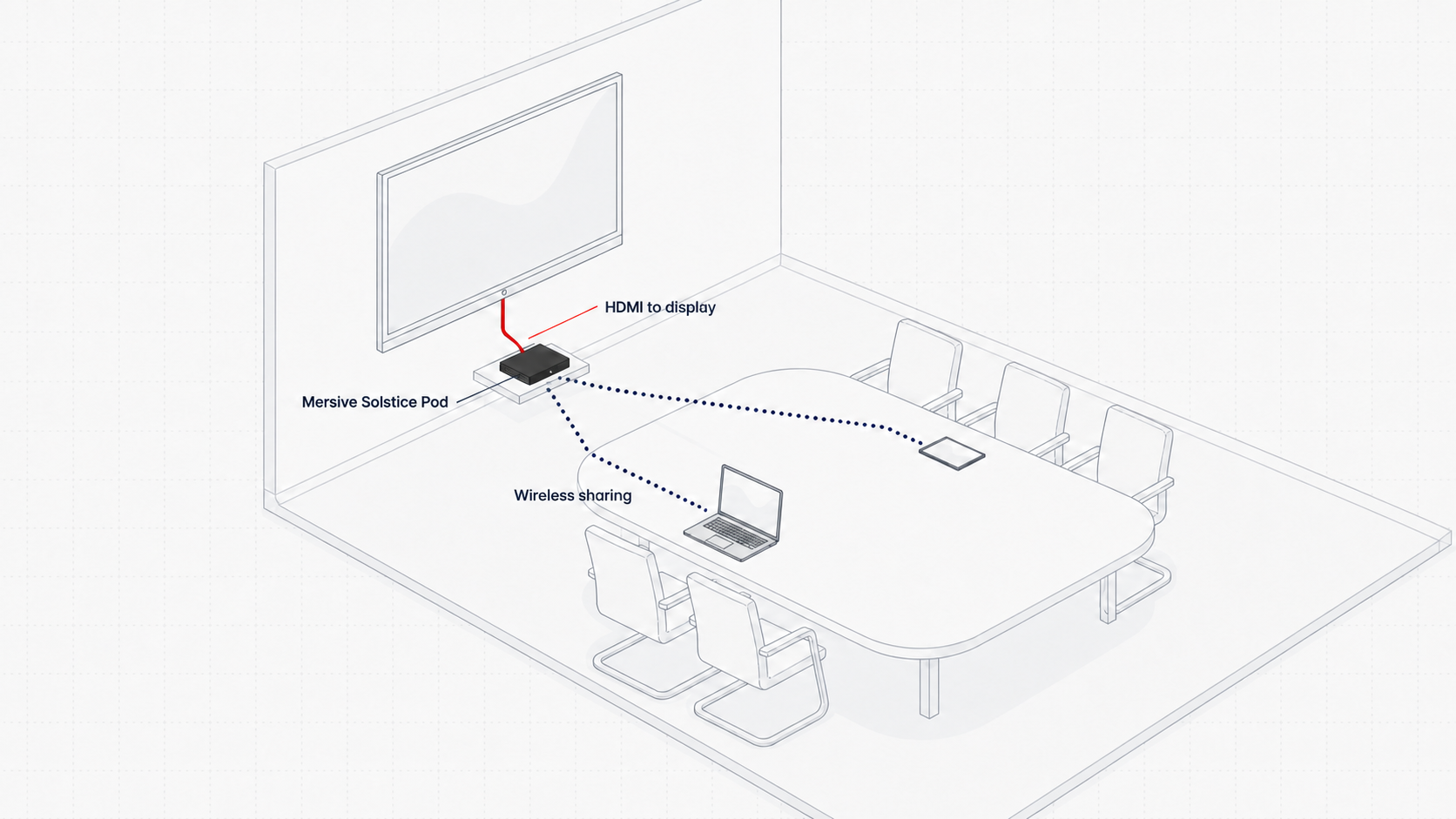
A meeting room display is usually active during a presentation, then left unused once the meeting ends. With the right meeting room technology, that same screen can support wireless collaboration during meetings and become meeting room digital signage between sessions.
This dual-purpose approach helps organizations get more value from an existing display. The room becomes easier to use when people need to collaborate, while the screen becomes a useful communication channel when nobody is presenting.
During the meeting: collaborate. Between meetings: communicate.
During meetings: collaborate without the cable routine
A wireless presentation system allows participants to share content without depending on a traditional cable-based presentation setup. Instead of passing an HDMI cable around the table or changing adapters between laptops, authorized users can connect through a supported wireless workflow.
For meeting participants, this can make it easier to:
- Share content from different users and compatible devices
- Move between presenters with fewer interruptions
- Compare information and contribute to a discussion
- Keep the room focused on collaboration instead of connection troubleshooting
The exact experience depends on the selected platform, network design, security policy, and user devices. A successful deployment should make the expected connection method clear and consistent across rooms.
Between meetings: turn the display into a communication channel
Once the meeting ends, the display does not have to go blank. It can become a digital communication point that supports the wider workplace.
Depending on the signage platform and the organization’s content plan, the screen can show:
- Company announcements and internal campaigns
- Welcome messages for employees, visitors, or events
- Room information and availability
- Health, safety, and workplace reminders
- Branded content and company updates
- Wayfinding or event information
This creates a practical connection between digital signage and meeting room collaboration. Rather than treating them as completely separate systems, organizations can plan how one display supports both workflows.
What Mersive added in August 2026
Mersive’s August 2026 release introduced digital signage caching. According to the company’s release notes, uploaded videos can be cached on supported devices and played from local storage instead of being continuously streamed from the cloud.
The same release also added the option to assign different cached videos to different room states. This means signage can change according to the status of the meeting space, subject to the capabilities and configuration of the deployed Mersive environment.
For example, an organization could plan content that:
- Welcomes participants before a scheduled session
- Shows general workplace communications while a room is available
- Displays different approved content when the room is in another configured state
This is more useful than treating every idle display in exactly the same way. Room-aware signage can make the screen more relevant to the people standing in front of it.
Why local signage caching matters
Digital signage often depends on network connectivity to retrieve or stream content. With locally cached video, selected content can play from device storage after it has been uploaded and distributed.
That can provide several operational benefits:
More resilient playback
Cached content can continue playing without continuous internet access, helping reduce the effect of a temporary connectivity interruption on approved signage videos.
Lower dependence on continuous streaming
Playing content locally reduces the need to repeatedly stream the same video to every supported room device.
A more scalable content model
For organizations managing several meeting spaces, centralized content assignment combined with local playback can create a more manageable approach. Device support, storage, scheduling, and administration should still be confirmed during solution design.
One display, two workplace workflows
| Room mode | What the display does | Workplace value |
|---|---|---|
| During meetings | Supports wireless presentation and collaborative content sharing | Helps participants present and contribute with fewer connection steps |
| Between meetings | Shows approved signage, room information, or internal communications | Turns idle screen time into a useful communication opportunity |
The value is not simply that the room has another feature. The value comes from designing two useful experiences around the same display.
What to consider before deployment
A dual-purpose meeting room display still needs a clear technical and content plan. Before rollout, organizations should assess:
- Compatibility: Confirm supported hardware, software versions, signage formats, storage limits, and management features.
- Room workflow: Define when collaboration ends, when signage begins, and how room status affects the screen.
- Network and security: Review wireless access, device management, user permissions, guest sharing, and content distribution.
- Content ownership: Decide who creates, approves, updates, and retires signage content.
- Design consistency: Use readable layouts, appropriate video lengths, and a common visual system across rooms.
- Operational support: Plan monitoring, updates, troubleshooting, and user guidance before scaling to multiple spaces.
A pilot room can help validate both experiences. Test how quickly users can begin sharing, how the display returns to signage, whether cached content behaves as expected, and whether administrators can manage the workflow efficiently.
Get more from the meeting room
A meeting room screen does not need to serve only the person presenting. With a well-designed combination of wireless collaboration and digital signage, it can support meetings when the room is active and workplace communication when the room is idle.
For enterprises planning new meeting rooms or upgrading existing spaces, the strongest result comes from treating displays, collaboration, signage, networking, security, and room management as parts of one environment.
Explore Mersive AV solutions, review NCG’s approach to smart office technology, or learn more about planning a complete meeting and boardroom environment.
Frequently asked questions
Can the same meeting room screen be used for collaboration and digital signage?
Yes. With a compatible platform and the right configuration, a display can support content sharing during a meeting and show approved signage when the room is not being used for collaboration.
When does digital signage appear on a meeting room display?
The behavior depends on the selected system and configuration. Signage is commonly shown when nobody is actively sharing content, and some platforms can also change content according to the room’s configured status.
Why cache digital signage videos locally?
Local caching allows selected videos to play from device storage, reducing reliance on continuous streaming and helping approved content continue playing during a temporary loss of internet connectivity.
Can signage content change based on room status?
Mersive’s August 2026 release notes describe the ability to assign different cached videos to different room states. Availability depends on the supported device, platform version, licensing, and configuration.
What should organizations assess before rollout?
Confirm device and software compatibility, security requirements, network design, content ownership, room-status behavior, storage limits, user workflows, and ongoing operational support.
Planning a meeting room that works beyond the meeting?
Nex Cambro Gen helps organizations design secure, seamless, and scalable meeting room environments using collaboration, AV, digital signage, and workplace technologies.
Product information: The August 2026 functionality described in this article is based on Mersive’s official release notes. Features and compatibility may vary by device, software version, license, and deployment configuration.
Continue Reading
Related Articles
Education Technology
How Mersive Solstice Supports Collaborative Learning in the AI Era
See how universities use Mersive Solstice to connect student devices, shared displays, active-learning workflows, and centrally managed collaboration.
Read Article
Meeting Room Technology
Best Meeting Room Setup for a More Secured, Seamless & Scalable Workplace
See how wireless presentation, intelligent video, AV switching, and a professional display work together in a more secure, seamless, and scalable meeting room.
Read Article
Financial Services
Why Financial Institutions Choose Mersive Solstice for Secure Collaboration
What the BNL Gruppo BNP Paribas and Business Development Bank of Canada deployments reveal about secure, manageable wireless collaboration in financial services.
Read Article